Checked against Anthropic’s help centre, pricing page and Claude’s own settings screens on 7 October 2026.
The short answer
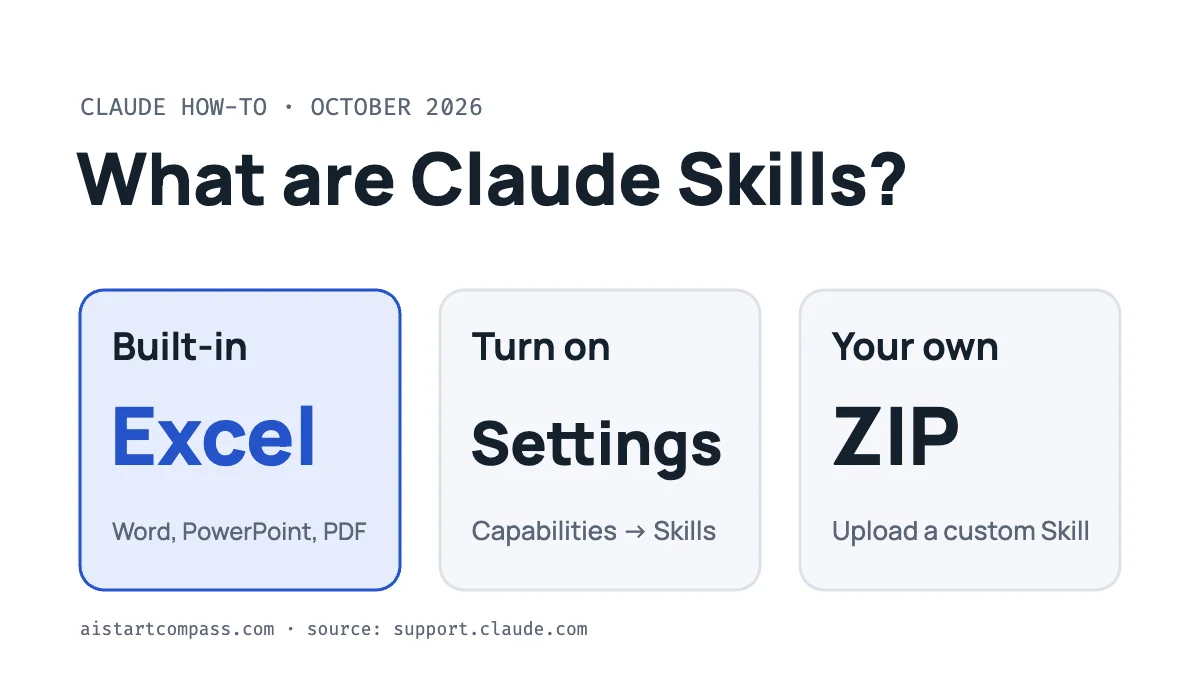
Claude Skills are ready-made sets of instructions, and sometimes files or code, that Claude loads by itself when a task needs them. For example, there are skills for making Excel spreadsheets, Word documents, PowerPoint decks and PDFs.
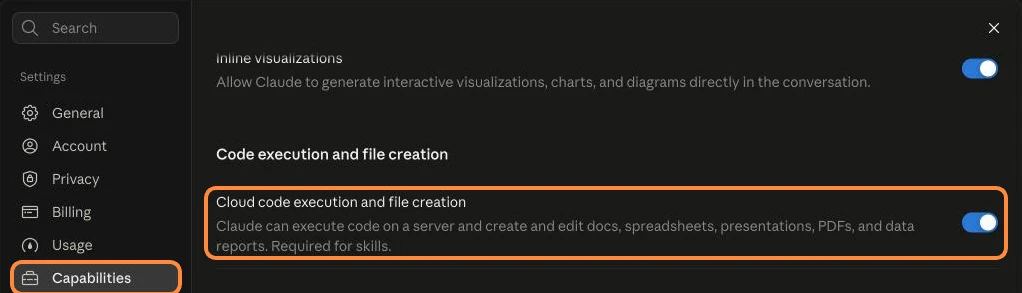
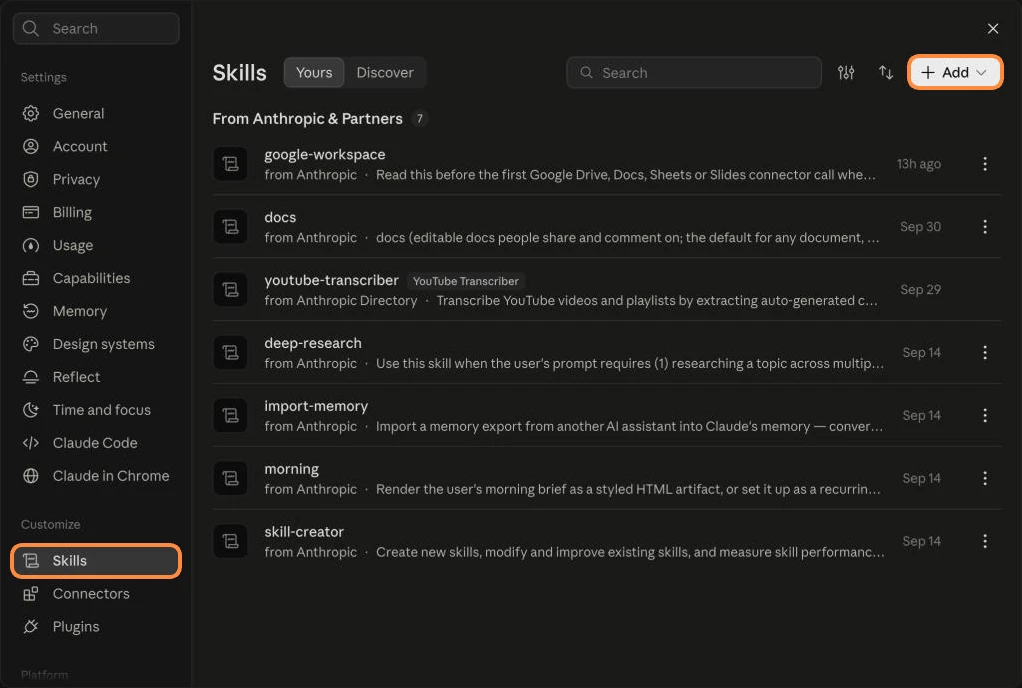
You find them in Settings → Customize → Skills, and they only work with Cloud code execution and file creation switched on under Settings → Capabilities. After that you don’t need to call them by name: just ask for the output, like “make me a spreadsheet of my budget”, and Claude uses the right skill.
What Claude Skills actually do
According to Anthropic’s Skills help page, Skills give Claude specialised knowledge and workflows, and Claude picks the relevant ones based on your task. Think of a Skill as a how-to guide Claude reads only when it needs it.
Anthropic’s built-in Skills cover:
- Excel spreadsheet creation and editing
- Word document creation
- PowerPoint presentations
- PDF creation and processing
You can also add Skills made by other companies, or create your own.
Which plans can use Skills?
Every plan. Anthropic’s Skills help page and pricing page both list Skills on Free, Pro, Max, Team and Enterprise, and Skills also work in Claude Code and the API. You just need code execution switched on first (see the steps below). On Team and Enterprise plans, an admin decides which Skills are available.
How to turn on Claude Skills
- Open Claude and go to Settings, then Capabilities.
- Make sure Cloud code execution and file creation is switched on. Claude labels this setting “Required for skills”.
- Now open Settings → Customize → Skills. The Yours tab lists the skills on your account, including Anthropic’s built-in ones, and the Discover tab lets you browse more.
- Go back to a chat and ask for what you need. Claude uses a matching Skill automatically.
How to add or create your own Skill
You can teach Claude your own way of doing a task, like your CV format or a weekly report layout. Anthropic’s Skills help page explains the process:
- Create the Skill in the required folder structure. At its heart is a short instructions file that says what the Skill does and when to use it.
- Package the folder as a ZIP file.
- Go to Customize → Skills, click the + Add button (top right), choose Create skill, then Upload a skill and pick your ZIP file.
Custom Skills you upload are private to your account. Anthropic also publishes example Skills on GitHub, and partner Skills from companies like Notion, Figma and Atlassian are listed in its directory at claude.com/connectors.
Only install Skills from sources you trust. Anthropic warns that a Skill can contain code and instructions, so a bad one could try to misuse your data. If a Skill comes from someone you don’t know, check its files before you turn it on.
Skills vs Projects vs connectors
These three features often get mixed up. Here’s the difference in one line each:
| Feature | What it gives Claude | Example |
|---|---|---|
| Skills | Know-how: how to do a type of task | “Make a PowerPoint the way I like it” |
| Projects | A workspace with your own files and instructions for one ongoing job | “Everything for my house move in one place” |
| Connectors | Access to your apps and data | “Read my Google Drive” or “check my Notion” |
Ideas for everyday Skills
A few ideas you could build for yourself, no coding needed beyond writing clear instructions:
- CV and cover letters: your layout, tone and the details you always include.
- Monthly budget: how you want your spending sorted into a spreadsheet.
- Email replies: your usual sign-off and style for work emails.
- Study notes: how you like summaries and flashcards laid out.
New to Claude, or deciding between it and ChatGPT? Our Claude vs ChatGPT comparison explains how the two differ on price and features.
FAQ
Are Claude Skills free?
Yes. Anthropic’s help page lists Skills on every plan, including Free. You just need Cloud code execution and file creation switched on in Settings → Capabilities.
Do I have to tell Claude which Skill to use?
No. Claude identifies and loads the relevant Skill automatically when your request needs it.
Why can’t I see the Skills section?
Skills now sit under Settings → Customize → Skills, not in Capabilities. They also need Cloud code execution and file creation switched on in Settings → Capabilities. On a work account, your admin may also control which Skills are available.
Are Skills the same as custom instructions?
No. Custom instructions apply to every chat. A Skill is only loaded when a task needs it, so you can have many Skills without cluttering every conversation.
Are Skills safe?
Anthropic’s own Skills are. For anything else, only install Skills from trusted sources and check what they contain first.
New to Claude? Start with Is Claude free? or compare plans in Claude Pro vs Max.
How this guide was made
- Checked against Anthropic’s Skills help page and pricing page on 7 October 2026.
- Drafted with help from an AI writing assistant, then fact-checked and edited by Adsen.
- We recheck this page when Anthropic changes how Skills work. No affiliate links.
Sources
- Using Skills in Claude, Claude Help Center, checked 7 October 2026
- Claude plans and pricing, checked 7 October 2026
- Anthropic’s example Skills on GitHub